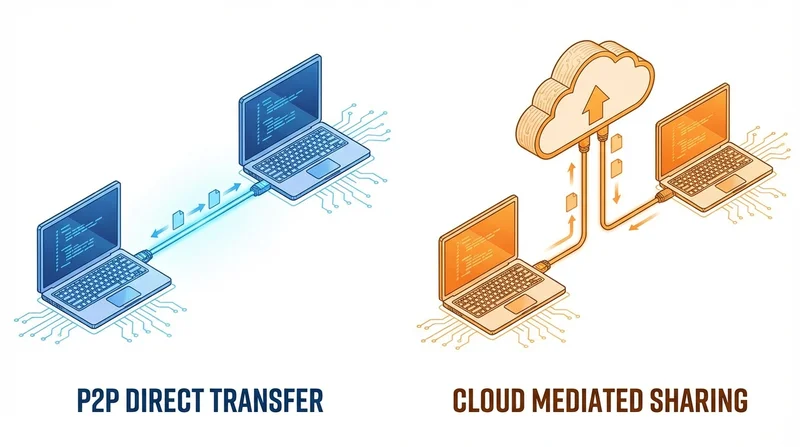
When sharing files, you have two fundamentally different approaches: peer-to-peer (P2P) transfer directly between devices, or cloud-based sharing through an intermediary server. Each has distinct advantages and trade-offs. This guide helps you understand when to use each approach.
Understanding the Two Approaches
Peer-to-Peer (P2P) File Sharing
P2P transfers files directly from one device to another without going through a central server. Examples include:
- AirDrop (Apple devices)
- Nearby Share (Android)
- Resilio Sync
- Syncthing
- Send Anywhere
Cloud-Based File Sharing
Cloud sharing uploads files to a server, then recipients download from that server. Examples include:
- GetShared
- Google Drive
- Dropbox
- WeTransfer
- OneDrive
Speed Comparison
P2P Speed Characteristics
Best case: P2P can be extremely fast. Direct local network transfers can reach gigabit speeds (100+ MB/s). This is because:
- No internet upload/download required
- Direct connection between devices
- Full bandwidth available
Worst case: P2P can fail entirely if:
- NAT/firewall blocks connections
- Both parties aren't online simultaneously
- Internet routing makes direct connection impossible
Cloud Speed Characteristics
Best case: Cloud services with good infrastructure provide consistent, reliable speeds. GetShared typically delivers 400-500+ Mbps.
Worst case: You're limited by your upload speed, which is often the slowest link. A 10 Mbps upload means a 5GB file takes about 70 minutes.
Speed Verdict
P2P wins for local transfers when conditions are ideal. Cloud wins for reliability and remote transfers. For a detailed analysis, see our file transfer speed comparison.
Reliability Comparison
P2P Reliability Issues
- Both parties must be online – If recipient isn't available, transfer can't happen
- Network restrictions – Corporate firewalls, certain ISPs, and NAT configurations can block P2P
- Connection drops – If either party's connection fails, transfer fails
- No retry mechanism – Failed transfers often need to start over
Cloud Reliability
- Asynchronous – Upload once, recipient downloads whenever convenient
- Redundant infrastructure – Files stored reliably until downloaded
- Resume capability – Interrupted downloads can resume
- Works through firewalls – Standard HTTPS traffic passes through any network
Reliability Verdict
Cloud wins decisively. For professional use, reliability trumps raw speed.
Security Comparison
P2P Security
Pros:
- Data doesn't pass through third-party servers
- No data stored externally
- Direct encryption between devices possible
Cons:
- Security depends on implementation
- Some P2P apps have had security vulnerabilities
- No audit trail
Cloud Security
Pros:
- Professional security implementation
- End-to-end encryption available
- Access controls (passwords, expiration)
- Audit trails and download tracking
Cons:
- Data passes through third party
- Must trust provider's security claims
Security Verdict
For sensitive files, a reputable cloud service with proper encryption often provides better security than ad-hoc P2P solutions. See our file sharing security best practices.
Convenience Comparison
P2P Convenience
- No account needed
- Works offline (local network)
- Instant for nearby transfers (AirDrop)
But:
- Requires coordination (both parties online)
- Sharing with multiple people is cumbersome
- Can't share with recipients you don't have direct contact with
Cloud Convenience
- Share with anyone via link
- No account required for recipients
- Share with multiple people at once
- Asynchronous – no coordination needed
- Access from any device
Convenience Verdict
Cloud wins for remote sharing and sharing with multiple recipients. P2P wins for quick local transfers between two nearby devices.
Use Case Recommendations
Use P2P When:
- Transferring files to someone in the same room
- Both devices are on the same network
- You need maximum speed for local transfer
- You want to avoid any cloud storage
- Files are extremely large (faster than upload/download)
Use Cloud When:
- Sharing with remote recipients
- Sharing with multiple people
- Recipient availability is uncertain
- You need tracking and security features
- Reliability is more important than raw speed
- Professional or business use
Hybrid Approaches
Some solutions combine both approaches:
- Resilio Sync – P2P with optional relay servers
- Syncthing – P2P with discovery servers
- Cloud services with P2P acceleration – Use local network when available
These can offer the best of both worlds but add complexity.
Cost Comparison
P2P Costs
- Most P2P apps are free
- No storage costs
- No transfer costs
Cloud Costs
- Free tiers available (GetShared: 20GB free)
- Paid plans for more storage/features
- Business features require subscription
Cost Verdict
P2P is cheaper, but cloud services often offer enough free storage for occasional use. For business, cloud features justify the cost.
Conclusion
The choice between P2P and cloud file sharing depends on your specific situation:
| Factor | P2P Wins | Cloud Wins |
|---|---|---|
| Local transfer speed | ✓ | |
| Reliability | ✓ | |
| Security features | ✓ | |
| Multiple recipients | ✓ | |
| Remote sharing | ✓ | |
| No account needed | ✓ | Varies |
| Tracking | ✓ | |
| Cost | ✓ |
For most users, cloud-based sharing offers the best balance of convenience, reliability, and features. GetShared provides fast, secure cloud sharing with no account required for recipients – try it free.